
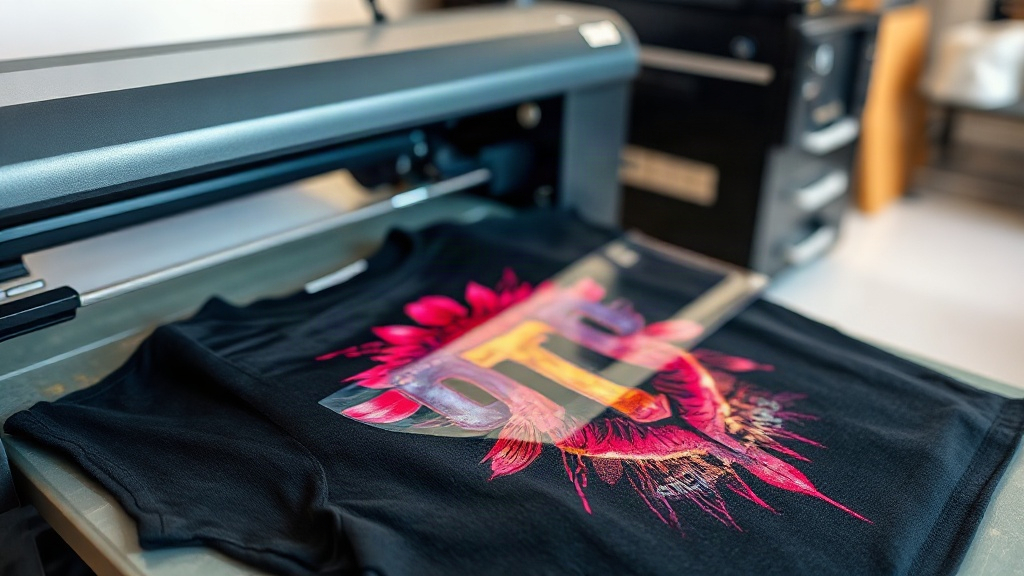
If you've been exploring custom apparel decoration, you've likely encountered DTF printing. Short for Direct-to-Film, this method has rapidly gained popularity for its ability to produce vibrant, detailed designs on a wide range of fabrics. Unlike other printing techniques, DTF doesn't require pre-treatment or specialized equipment beyond a printer and a heat press, making it accessible for small businesses and hobbyists alike. In this guide, we'll walk you through the entire DTF process, from creating your design to pressing it onto a garment, and share tips to ensure professional-looking results every time.
What is DTF Printing?
DTF printing is a digital printing method where your design is printed onto a special film, coated with a powder adhesive, and then heat-pressed onto fabric. The magic lies in the adhesive powder: it melts and bonds the ink to the fabric, creating a durable, stretchable print that feels soft to the touch. Because the design is printed on a film first, you can transfer it to almost any fabric, including cotton, polyester, blends, and even leather. This versatility sets DTF apart from other methods like DTG (Direct-to-Garment) or vinyl, which have limitations on fabric types and colors.
How DTF Works: Step by Step
- Design Preparation: Start with a high-resolution image. Mirror it horizontally before printing. DTF printers use CMYK plus white ink, so ensure your design has transparent backgrounds where needed.
- Printing: Load the DTF film into your printer. The printer lays down a layer of white ink (for opacity) followed by the color layers. Some printers do this in one pass, others require two.
- Powder Application: While the ink is still wet, sprinkle the adhesive powder evenly over the printed area. Shake off excess powder.
- Curing: Place the film in a curing oven or under a heat press for a few minutes until the powder melts and becomes glossy. This step is crucial for wash durability.
- Transfer: Set your heat press to the recommended temperature (usually 300-350°F). Place the film on the garment, press for 15-30 seconds, then peel the film off while hot or cold, depending on the film type.
Each step requires attention to detail, but with practice, you'll develop a rhythm that yields consistent results.
Why Choose DTF for Your Custom Apparel?
There are several reasons why DTF printing stands out:
- Fabric Freedom: Works on cotton, polyester, blends, and even treated leather. No need to stock multiple types of vinyl or worry about adhesion issues.
- Color Vibrancy: The white ink base allows for bright, opaque colors on dark garments without a separate underbase.
- Detail and Gradients: DTF excels at photographic images and fine details, unlike vinyl which is limited to solid colors and simple shapes.
- Durability: When properly applied, DTF prints withstand dozens of washes without cracking or fading.
- Cost-Effective for Short Runs: No screens or setup fees, making it ideal for one-off items or small batches.
Whether you're printing team jerseys, personalized gifts, or promotional merchandise, DTF offers flexibility that traditional methods can't match.
Common Challenges and How to Overcome Them
Even though DTF is user-friendly, beginners often face a few hurdles. Here are solutions to the most common issues:
1. Print Not Adhering Properly
If your transfer peels off after washing, it's likely due to insufficient pressure, incorrect temperature, or under-cured powder. Ensure your heat press applies even pressure (check with a pressure gauge) and that the powder is fully melted. Also, make sure the garment is free of wrinkles and moisture before pressing.
2. Faded or Dull Colors
Dull prints often result from using too little white ink or not shaking the ink cartridges before printing. DTF printers require regular maintenance; clogged nozzles can lead to inconsistent output. Run a nozzle check and clean the printhead as needed.
3. Film Sticking to the Garment
This usually happens when you peel the film at the wrong temperature. Some films are hot-peel, others cold-peel. Check your film's specifications and adjust your process accordingly. Also, allow the transfer to cool completely before peeling if using cold-peel film.
4. Cracking After Washing
Cracking indicates the print was stretched beyond its elasticity or the adhesive wasn't fully cured. Use a stretchable DTF film designed for high-elasticity fabrics, and ensure proper curing time and temperature. Washing garments inside out in cold water and avoiding bleach will also extend the life of your prints.
DTF vs. Other Printing Methods
How does DTF compare to DTG, screen printing, and vinyl? Here's a quick breakdown:
- DTG: Best for 100% cotton, but requires pre-treatment and can be less vibrant on dark colors. DTF works on more fabrics and has better opacity.
- Screen Printing: Cost-effective for large orders but involves setup costs and limited colors. DTF is better for detailed, multi-color designs and small runs.
- Vinyl: Great for simple text and shapes, but not for complex images. DTF handles gradients and photos with ease.
While each method has its place, DTF shines for its versatility and ability to produce high-quality, full-color transfers without specialized fabric restrictions.
Essential Equipment for DTF Printing
To get started with DTF, you'll need:
- DTF Printer: A dedicated printer that uses DTF inks (CMYK + white). Popular models include those from Epson, Roland, and Chinese brands like Audley.
- DTF Film: Available in sheets or rolls, with matte or glossy finishes. Choose based on your printer and desired feel.
- Adhesive Powder: Typically TPU-based, available in fine or coarse grades. Fine powder is better for detailed prints.
- Curing Oven or Heat Press: For melting the powder. A heat press can double as a curing station if it has a lower platen.
- Heat Press: For transferring the design onto garments. A swing-away press is recommended for even pressure.
- Software: RIP software (Raster Image Processor) to manage color profiles and print settings.
While the initial investment can be significant, the cost per print is low, making DTF a profitable venture for small businesses.
Tips for Perfect DTF Transfers
After countless trials, here are my top tips for flawless DTF results:
- Test Your Settings: Every printer, film, and powder combo behaves differently. Keep a log of temperature, pressure, and time for each fabric type.
- Control Humidity: High humidity can cause powder to clump. Store powder in an airtight container and work in a dry environment.
- Use Quality Film: Cheaper films may cause ink bleeding or poor release. Invest in reputable brands.
- Press Twice for Dark Garments: A second press with a Teflon sheet can improve adhesion and smoothness.
- Wash Inside Out: Advise customers to wash garments inside out in cold water and tumble dry low to prolong print life.
With practice, you'll develop an intuition for what works best in your setup.
Frequently Asked Questions
What fabrics can I use with DTF printing?
DTF works on a wide range of fabrics, including cotton, polyester, cotton-poly blends, nylon, and leather. It's particularly useful for fabrics that are difficult to print with other methods, such as those with high polyester content or stretchy materials.
How long does a DTF transfer last?
When applied correctly, DTF transfers can last as long as the garment itself, often enduring 50+ washes without significant fading or cracking. Proper curing and washing inside out are key to longevity.
Can I use DTF on dark shirts?
Absolutely. DTF uses a white ink base, so colors remain vibrant on dark fabrics. In fact, it's one of the best methods for printing on black or navy shirts.
Do I need special software for DTF printing?
While not strictly required, RIP software is highly recommended. It helps manage color profiles, white ink layering, and print settings to ensure consistent, high-quality output.
Is DTF printing cost-effective for small businesses?
Yes, especially for short runs and custom orders. There are no setup fees or minimums, and the cost per print is relatively low once you've invested in the equipment. It's a great way to offer personalized products without large overhead.